
3.2 Key Computer Components
Learning Objectives
After studying this section you should be able to do the following:
- Define Moore’s Law and understand the approximate rate of advancement for other technologies, including magnetic storage (disk drives) and telecommunications (fiber-optic transmission).
- Understand how the price elasticity associated with faster and cheaper technologies opens new markets, creates new opportunities for firms and society, and can catalyze industry disruption.
- Recognize and define various terms for measuring data capacity.
- Consider the managerial implication of faster and cheaper computing on areas such as strategic planning, inventory, and accounting.
Faster and cheaper—those two words have driven the computer industry for decades, and the rest of the economy has been along for the ride. Today it’s tough to imagine a single industry not impacted by more powerful, less expensive computing. Faster and cheaper puts mobile phones in the hands of peasant farmers, puts a free video game in your Happy Meal, and drives the drug discovery that may very well extend your life.
This phenomenon of “faster, cheaper” computing is often referred to as Moore’s Law, after Intel co-founder, Gordon Moore. Moore didn’t show up one day, stance wide, hands on hips, and declare “behold my law,” but he did write a four-page paper for Electronics Magazine in which he described how the process of chip making enabled more powerful chips to be manufactured at cheaper prices (Moore, 1965).
Moore’s friend, legendary chip entrepreneur and CalTech professor Carver Mead, later coined the “Moore’s Law” moniker. That name sounded snappy, plus as one of the founders of Intel, Moore had enough geek cred for the name to stick. Moore’s original paper offered language only a chip designer would love, so we’ll rely on the more popular definition: chip performance per dollar doubles every eighteen months (Moore’s original paper assumed two years, but many sources today refer to the eighteen-month figure, so we’ll stick with that).
Moore’s Law applies to chips—broadly speaking, to processors, or the electronics stuff that’s made out of silicon1. The microprocessor is the brain of a computing device. It’s the part of the computer that executes the instructions of a computer program, allowing it to run a Web browser, word processor, video game, or virus. For processors, Moore’s Law means that next generation chips should be twice as fast in eighteen months, but cost the same as today’s models (or from another perspective, in a year and a half, chips that are same speed as today’s models should be available for half the price).
Random-access memory (RAM) is chip-based memory. The RAM inside your personal computer is volatile memory, meaning that when the power goes out, all is lost that wasn’t saved to nonvolatile memory (i.e., a more permanent storage media like a hard disk or flash memory). Think of RAM as temporary storage that provides fast access for executing computer programs and files. When you “load” or “launch” a program, it usually moves from your hard drive to those RAM chips, where it can be more quickly executed by the processor.
Cameras, MP3 players, USB drives, and mobile phones often use flash memory (sometimes called flash RAM). It’s not as fast as the RAM used in most traditional PCs, but holds data even when the power is off (so flash memory is also nonvolatile memory). You can think of flash memory as the chip-based equivalent of a hard drive. In fact, flash memory prices are falling so rapidly that several manufactures including Apple and the One Laptop per Child initiative (see the “Tech for the Poor” sidebar later in this section) have begun offering chip-based, nonvolatile memory as an alternative to laptop hard drives. The big advantage? Chips are solid state electronics (meaning no moving parts), so they’re less likely to fail, and they draw less power. The solid state advantage also means that chip-based MP3 players like the iPod nano make better jogging companions than hard drive players, which can skip if jostled. For RAM chips and flash memory, Moore’s Law means that in eighteen months you’ll pay the same price as today for twice as much storage.
Computer chips are sometimes also referred to as semiconductors (a substance such as silicon dioxide used inside most computer chips that is capable of enabling as well as inhibiting the flow of electricity). So if someone refers to the semiconductor industry, they’re talking about the chip business2.
Strictly speaking, Moore’s Law does not apply to other technology components. But other computing components are also seeing their price versus performance curves skyrocket exponentially. Data storage doubles every twelve months. Networking speed is on a tear, too. With an equipment change at the ends of the cables, the amount of data that can be squirted over an optical fiber line can double every nine months3. These numbers should be taken as rough approximations and shouldn’t be expected to be strictly precise over time. However, they are useful as rough guides regarding future computing price/performance trends. Despite any fluctuation, it’s clear that the price/performance curve for many technologies is exponential, offering astonishing improvement over time.
Figure 5.1 Advancing Rates of Technology (Silicon, Storage, Telecom)
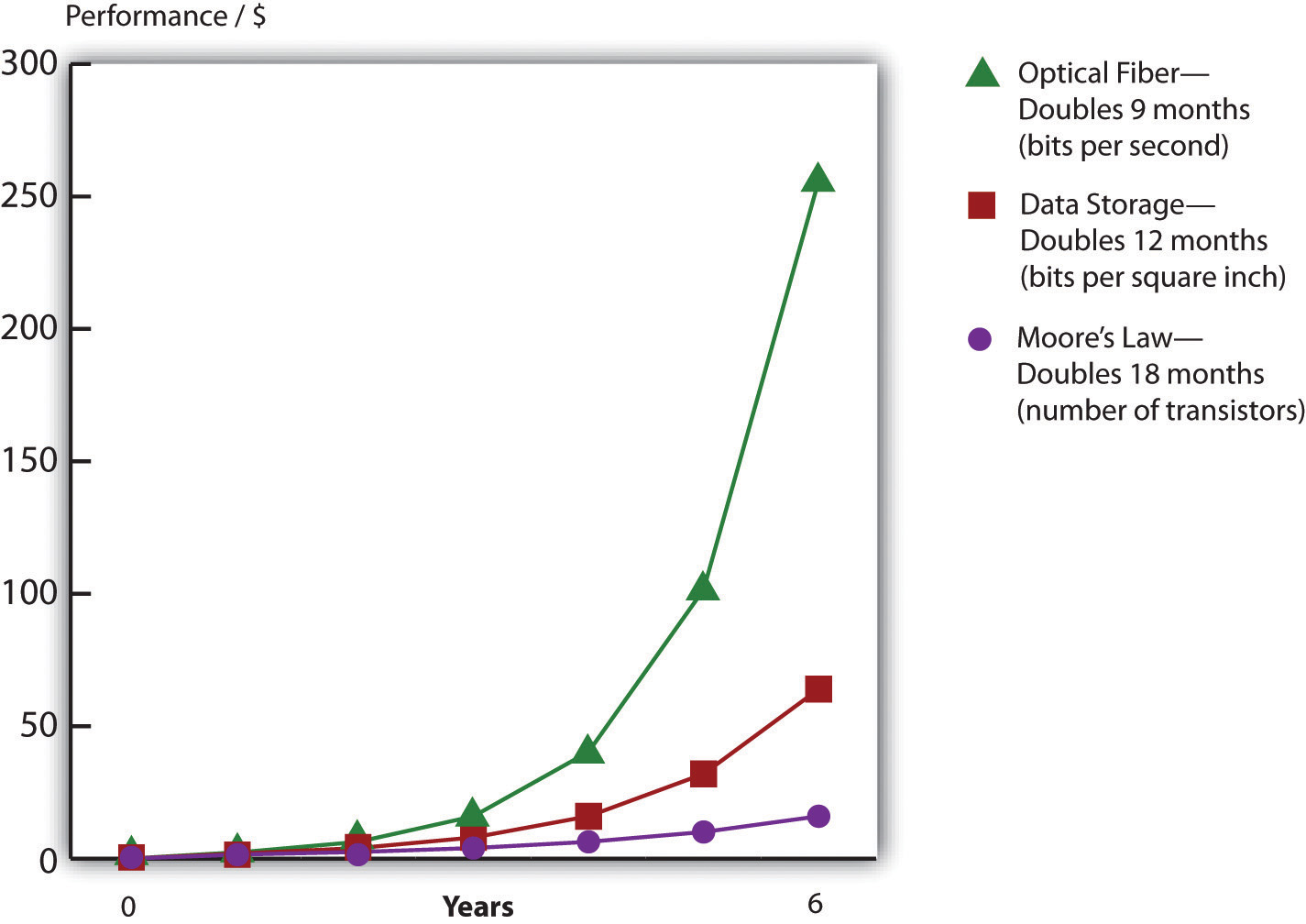
Adopted from Shareholder Presentation by Jeff Bezos, Amazon.com, 2006.
Get Out Your Crystal Ball
Faster and cheaper makes possible the once impossible. As a manager, your job will be about predicting the future. First, consider how the economics of Moore’s Law opens new markets. When technology gets cheap, price elasticity kicks in. Tech products are highly price elastic, meaning consumers buy more products as they become cheaper4. And it’s not just that existing customers load up on more tech; entire new markets open up as firms find new uses for these new chips.
Just look at the five waves of computing we’ve seen over the previous five decades (Copeland, 2005). In the first wave in the 1960s, computing was limited to large, room-sized mainframe computers that only governments and big corporations could afford. Moore’s Law kicked in during the 1970s for the second wave, and minicomputers were a hit. These were refrigerator-sized computers that were as speedy as or speedier than the prior generation of mainframes, yet were affordable by work groups, factories, and smaller organizations. The 1980s brought wave three in the form of PCs, and by the end of the decade nearly every white-collar worker in America had a fast and cheap computer on their desk. In the 1990s wave four came in the form of Internet computing—cheap servers and networks made it possible to scatter data around the world, and with more power, personal computers displayed graphical interfaces that replaced complex commands with easy-to-understand menus accessible by a mouse click. At the close of the last century, the majority of the population in many developed countries had home PCs, as did most libraries and schools.
Now we’re in wave five, where computers are so fast and so inexpensive that they have become ubiquitous—woven into products in ways few imagined years before. Silicon is everywhere! It’s in the throwaway radio frequency identification (RFID) tags that track your luggage at the airport. It provides the smarts in the world’s billion-plus mobile phones. It’s the brains inside robot vacuum cleaners, next generation Legos, and the table lamps that change color when the stock market moves up or down. These digital shifts can rearrange entire industries. Consider that today the firm that sells more cameras than any other is Nokia, a firm that offers increasingly sophisticated chip-based digital cameras as a giveaway as part of its primary product, mobile phones. This shift has occurred with such sweeping impact that former photography giants Pentax, Konica, and Minolta have all exited the camera business.
Moore’s Law inside Your Medicine Cabinet
Moore’s Law is about to hit your medicine cabinet. The GlowCap from Vitality, Inc., is a “smart” pill bottle that will flash when you’re supposed to take your medicine. It will play a little tune if you’re an hour late for your dose and will also squirt a signal to a night-light that flashes as a reminder (in case you’re out of view of the cap). GlowCaps can also be set to call or send a text if you haven’t responded past a set period of time. And the device will send a report to you, your doc, or whomever else you approve. The GlowCap can even alert your pharmacy when it’s time for refills. Amazon sells the device for $99, but we know how Moore’s Law works—it’ll soon likely be free. The business case for that? The World Health Organization estimates drug adherence at just 50 percent, and analysts estimate that up to $290 billion in increased medical costs are due to patients missing their meds. Vitality CEO David Rose (who incidentally also cofounded Ambient Devices) recently cited a test in which GlowCap users reported a 98 percent medication adherence rate (Rose, 2010).
Figure 5.3

The GlowCap from Vitality, Inc., will flash, beep, call, and text you if you’ve skipped your meds. It can also send reports to you, your doctor, and your loved ones and even notify your pharmacy when it’s time for a refill.
Juhan Sonin – Glowcap – CC BY 2.0.
And there might also be a chip inside the pills, too! Proteus, a Novartis-backed venture, has developed a sensor made of food and vitamin materials that can be swallowed in medicine. The sensor is activated and powered by the body’s digestive acids (think of your stomach as a battery). Once inside you, the chip sends out a signal with vitals such as heart rate, body angle, temperature, sleep, and more. A waterproof skin patch picks up the signal and can wirelessly relay the pill’s findings when the patient walks within twenty feet of their phone. Proteus will then compile a report from the data and send it to their mobile device or e-mail account. The gizmo’s already in clinical trials for heart disease, hypertension, and tuberculosis and for monitoring psychiatric illnesses (Landau, 2010).
One of the most agile surfers of this fifth wave is Apple, Inc.—a firm with a product line that is now so broad that in January 2007, it dropped the word “Computer” from its name. Apple’s breakout resurgence owes a great deal to the iPod. At launch, the original iPod sported a 5 GB hard drive that Steve Jobs declared would “put 1,000 songs in your pocket.” Cost? $399. Less than six years later, Apple’s highest-capacity iPod sold for fifty dollars less than the original, yet held forty times the songs. By that time the firm had sold over one hundred fifty million iPods—an adoption rate faster than the original Sony Walkman. Apple’s high-end models have morphed into Internet browsing devices capable of showing maps, playing videos, and gulping down songs from Starbucks’ Wi-Fi while waiting in line for a latte. Fast forward to 2019: Your iPod touch now comes with up to 256GB of storage for only $199.
The original iPod has also become the jumping-off point for new business lines including the iPhone, Apple TV, iPad, and iTunes. As an online store, iTunes is always open. ITunes regularly sells tens of millions of songs on Christmas Day alone, a date when virtually all of its offline competition is closed for the holiday. In a short five years after its introduction, iTunes has sold over 4 billion songs and has vaulted past retail giants Wal-Mart, Best Buy, and Target to become the number one music retailer in the world. Today’s iTunes is a digital media powerhouse, selling movies, TV shows, games, and other applications. And with podcasting, Apple’s iTunes University even lets students at participating schools put their professors’ lectures on their gym playlist for free. Surfing the fifth wave has increased the value of Apple stock sixteenfold six years after the iPod’s launch. Ride these waves to riches, but miss the power and promise of Moore’s Law and you risk getting swept away in its riptide. Apple’s rise occurred while Sony, a firm once synonymous with portable music, sat on the sidelines unwilling to get on the surfboard. Sony’s stock stagnated, barely moving in six years. The firm has laid off thousands of workers while ceding leadership in digital music (and video) to Apple.
Table 5.1 Top U.S. Music Retailers
| 1992 | 2005 | 2006 | 2008 |
|---|---|---|---|
| 1. Musicland | 1. Wal-Mart | 1. Wal-Mart | 1. iTunes |
| 2. The Handleman | 2. Best Buy | 2. Best Buy | 2. Wal-Mart |
| 3. Tower Records | 3. Target | 3. Target | 3. Best Buy |
| 4. Trans World Music
|
…
7. iTunes |
4. iTunes, Amazon tie
|
4. Amazon, Target tie
|
| Moore’s Law restructures industries. The firms that dominated music sales when you were born are now bankrupt, while one that had never sold a physical music CD now sells more than anyone else. | |||
Source: Michelle Quinn and Dawn C. Chmielewski, “Top Music Seller’s Store Has No Door,” Los Angeles Times, April 4, 2008.
While the change in hard drive prices isn’t directly part of Moore’s Law (hard drives are magnetic storage, not silicon chips), as noted earlier, the faster and cheaper phenomenon applies to storage, too. Look to Amazon as another example of jumping onto a once-impossible opportunity courtesy of the price/performance curve. When Amazon.com was founded in 1995, the largest corporate database was one terabyte, or TB (see below) in size. In 2003, the firm offered its “Search Inside the Book” feature, digitizing the images and text from thousands of books in its catalog. “Search Inside the Book” lets customers peer into a book’s contents in a way that’s both faster and more accurate than browsing a physical bookstore. Most importantly for Amazon and its suppliers, titles featured in “Search Inside the Book” enjoyed a 7 percent sales increase over nonsearchable books. When “Search Inside the Book” launched, the database to support this effort was 20 TB in size. In just eight years, the firm found that it made good business sense to launch an effort that was a full twenty times larger than anything used by any firm less than a decade earlier. And of course, all of these capacities seem laughably small by today’s standards.
For Amazon, the impossible had not just become possible; it became good business. By 2009, digital books weren’t just for search; they were for sale. Amazon’s Kindle reader (a Moore’s Law marvel sporting a microprocessor and flash storage) became the firm’s top-selling product in terms of both unit sales and dollar volume. The real business opportunity for Amazon isn’t Kindle as a consumer electronics device but as an ever-present, never-closing store, which also provides the firm with a migration path from atoms to bits. By 2009, Amazon (by then the largest book retailer in North America) reported, “For books that are available on the Kindle, sales are already 35 percent of the same books in print” (Schonfeld, 2009).
competitive advantage review
- How is Barnes & Noble doing these days?
- Whatever happened to Borders?
- What is Half Price Books’ advantage?
- How can smaller bookstores compete with Amazon?
Bits and Bytes
Computers express data as bits that are either one or zero. Eight bits form a byte (think of a byte as being a single character you can type from a keyboard). A kilobyte refers to roughly a thousand bytes, or a thousand characters, megabyte = 1 million, gigabyte = 1 billion, terabyte = 1 trillion, petabyte = 1 quadrillion, and exabyte = 1 quintillion bytes.
While storage is most often listed in bytes, telecommunication capacity (bandwidth) is often listed in bits per second (bps). The same prefixes apply (Kbps = kilobits, or one thousand bits, per second, Mbps = megabits per second, Gbps = gigabits per second, and Tbps = terabits per second).
These are managerial definitions, but technically, a kilobyte is 210 or 1,024 bytes, mega = 220, giga = 230, tera = 240, peta = 250, and exa = 260. To get a sense for how much data we’re talking about, see the table below Schuman, 2004; Huggins, 2008).
| Managerial Definition | Exact Amount | To Put It in Perspective | |
|---|---|---|---|
| 1 Byte | One keyboard character | 8 bits | 1 letter or number = 1 byte |
| 1 Kilobyte (KB) | One thousand bytes | 210 bytes | 1 typewritten page = 2 KB |
| 1 digital book (Kindle) = approx. 500–800 KB | |||
| 1 Megabyte (MB) | One million bytes | 220 bytes | 1 digital photo (7 megapixels) = 1.3 MB |
| 1 MP3 song = approx. 3 MB | |||
| 1 CD = approx. 700 MB | |||
| 1 Gigabyte (GB) | One billion bytes | 230 bytes | 1 DVD movie = approx. 4.7 GB |
| 1 Blu-ray movie = approx. 25 GB | |||
| 1 Terabyte (TB) | One trillion bytes | 240 bytes | Printed collection of the Library of Congress = 20 TB |
| 1 Petabyte (PB) | One quadrillion bytes | 250 bytes | Wal-Mart data warehouse (2008) = 2.5 PB |
| 1 Exabyte (EB) | One quintillion bytes | 260 bytes | |
| 1 Zettabyte (ZB) | One sextillion bytes | 270 bytes | Amount of data consumed by U.S. households in 2008 = 3.6 ZB |
Here’s another key implication—if you are producing products with a significant chip-based component, the chips inside that product rapidly fall in value. That’s great when it makes your product cheaper and opens up new markets for your firm, but it can be deadly if you overproduce and have excess inventory sitting on shelves for long periods of time. Dell claims its inventory depreciates as much as a single percentage point in value each week (Breen, 2004). That’s a big incentive to carry as little inventory as possible, and to unload it, fast!
While the strategic side of tech may be the most glamorous, Moore’s Law impacts mundane management tasks, as well. From an accounting and budgeting perspective, as a manager you’ll need to consider a number of questions: How long will your computing equipment remain useful? If you keep upgrading computing and software, what does this mean for your capital expense budget? Your training budget? Your ability to make well-reasoned predictions regarding tech’s direction will be key to answering these questions.
Key Takeaways
- Moore’s Law applies to the semiconductor industry. The widely accepted managerial interpretation of Moore’s Law states that for the same money, roughly eighteen months from now you should be able to purchase computer chips that are twice as fast or store twice as much information. Or over that same time period, chips with the speed or storage of today’s chips should cost half as much as they do now.
- Nonchip-based technology also advances rapidly. Disk drive storage doubles roughly every twelve months, while equipment to speed transmissions over fiber-optic lines has doubled every nine months. While these numbers are rough approximations, the price/performance curve of these technologies continues to advance exponentially.
- These trends influence inventory value, depreciation accounting, employee training, and other managerial functions. They also help improve productivity and keep interest rates low.
- From a strategic perspective, these trends suggest that what is impossible from a cost or performance perspective today may be possible in the future. This fact provides an opportunity to those who recognize and can capitalize on the capabilities of new technology. As technology advances, new industries, business models, and products are created, while established firms and ways of doing business can be destroyed.
- Managers must regularly study trends and trajectory in technology to recognize opportunity and avoid disruption.
Questions and Exercises
- What is Moore’s Law? What does it apply to?
- Are other aspects of computing advancing as well? At what rates?
- What is a microprocessor? What devices do you or your family own that contain microprocessors (and hence are impacted by Moore’s Law)?
- What is a semiconductor? What is the substance from which most semiconductors are made?
- How does flash memory differ from the memory in a PC? Are both solid state?
- Which of the following are solid state devices: an iPod shuffle, a TiVo DVR, a typical laptop PC?
- Why is Moore’s Law important for managers? How does it influence managerial thinking?
- What is price elasticity? How does Moore’s Law relate to this concept? What’s special about falling chip prices compared to price drops for products like clothing or food?
- Give examples of firms that have effectively leveraged the advancement of processing, storage, and networking technology.
- What are the five waves of computing? Give examples of firms and industries impacted by the fifth wave.
- As Moore’s Law advances, technology becomes increasingly accessible to the poor. Give examples of how tech has benefited those who likely would not have been able to afford the technology of a prior generation.
- How have cheaper, faster chips impacted the camera industry? Give an example of the leadership shifts that have occurred in this industry.
- What has been the impact of “faster, cheaper” on Apple’s business lines?
- How did Amazon utilize the steep decline in magnetic storage costs to its advantage?
- How does Moore’s Law impact production and inventory decisions?
1Although other materials besides silicon are increasingly being used.
2Semiconductor materials, like the silicon dioxide used inside most computer chips, are capable of enabling as well as inhibiting the flow of electricity. These properties enable chips to perform math or store data.
3Fiber-optic lines are glass or plastic data transmission cables that carry light. These cables offer higher transmission speeds over longer distances than copper cables that transmit electricity.
4As opposed to goods and services that are price inelastic (like health care and housing), which consumers will try their best to buy even if prices go up.
References
Breen, B., “Living in Dell Time,” Fast Company, November 24, 2004.
Copeland, M., “How to Ride the Fifth Wave,” Business 2.0, July 1, 2005.
Corbett, S., “Can the Cellphone Help End Global Poverty?” New York Times Magazine, April 13, 2008.
Ewing, J., “Upwardly Mobile in Africa,” BusinessWeek, September 24, 2007, 64–71.
Huggins, J., “How Much Data Is That?” Refrigerator Door, August 19, 2008.
Landau, E., “Tattletale Pills, Bottles Remind You to Take Your Meds,” CNN, February 2, 2010.
Lawton, C., “The X.O. Laptop Two Years Later,” Wired, June 19, 2009.
Miller, J., “Goodbye G.U.I? Ambient Orb a Computer ‘Mood Ring,’” Mass High Tech, February 10, 2003.
Moore, G., “Cramming More Components onto Integrated Circuits,” Electronics Magazine, April 19, 1965.
Rose, D., presentation as part of “From Disruption to Innovation” at the MIT Enterprise Forum, Cambridge, MA, June 23, 2010.
Schonfeld,E., “For Books Available on Kindle, Sales Are Now Tracking at 35 Percent of Print Sales,” TechCrunch, May 6, 2009.
Schuman, E., “At Wal-Mart, World’s Largest Retail Data Warehouse Gets Even Larger,” eWeek, October 13, 2004.
Information Systems: A Manager’s Guide to Harnessing Technology is intended for use in undergraduate and/or graduate courses in Management Information Systems and Information Technology.
https://doi.org/10.24926/8668.1101
ISBN: 978-1-946135-12-4
License:

Creative Commons Attribution NonCommercial ShareAlike
